Secret management
you actually like
Every environment’s secrets under AES-256-GCM envelope encryption, with roles, versions and a
full audit trail — then sink pull them straight
into your .env.
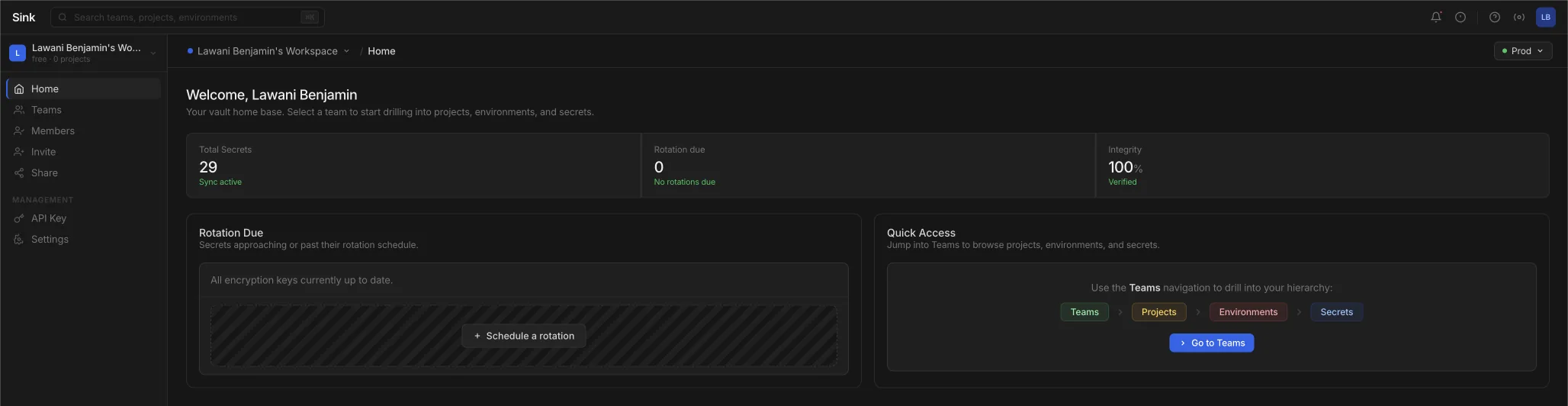
Built on primitives you can name, not a black box.
One place for every environment.
Engineered for security, refined for simplicity.
Envelope encryption
Every secret gets its own AES-256-GCM data encryption key, and that key is itself encrypted under the master key before it touches the database. Two layers, and no plaintext at rest — not the value, not the key that opens it.
Structure that isolates
Workspaces hold teams, teams hold projects, projects hold environments. Dev, staging and production never see each other’s values.
Roles, and a record
Four tiers — Viewer, Member, Admin, Owner — decide who can read and who can change. Every read, write, delete and share is written to the audit log with the member and the timestamp.
Bring what you already have
Pull your variables straight out of Railway, Vercel, Render, Doppler, Infisical, AWS Secrets
Manager or Azure Key Vault — or paste a .env. You see the
exact diff before anything is written, and choose whether existing keys are skipped or versioned.
Credentials are used for that one request and discarded, unless you save them as a connection.
Share without onboarding
Hand a contractor one key or a whole environment through a link that expires and dies after a set number of views. No account needed on their end.
Versions, not guesswork
Every update keeps the one before it. Each version carries its own encryption, its timestamp and the member who made the change, so rolling back is a lookup rather than an archaeology project.
A CLI that speaks .env.
Four commands, and done.
sink init links a directory to an environment.
pull writes the .env,
push sends it back,
diff shows the drift first. Your API key lives in the OS keyring,
and any version of a secret is one flag away.
$ sink init
✓ Linked ./api → acme / backend / production

$ sink pull
✓ Wrote 24 secrets to .env

$ sink diff
~ DATABASE_URL          local ≠ remote
+ STRIPE_WEBHOOK_SECRET remote only
Transparent options for teams of all sizes.
Billed monthly in USD.
Envelope encryption, roles and the full audit trail are on every plan.
Free
For trying Sink out on a single project.
- ✓ 1 workspace, 1 project, 1 environment
- ✓ Up to 100 secrets
- ✓ 3 seats and 2 teams
- ✓ Imports from Railway, Vercel & Render
Starter
PopularFor small teams running real workloads.
- ✓ 3 workspaces, 25 projects, 10 environments each
- ✓ Up to 2,000 secrets
- ✓ 10 seats and 10 teams per workspace
- ✓ Secure share links & secret versioning
Scale
Unlimited everything, for organisations.
- ✓ Unlimited workspaces, teams & projects
- ✓ Unlimited environments & secrets
- ✓ 40 seats per workspace
- ✓ Everything in Starter
Frequently asked questions.
The details, before you sign up.
Sink uses envelope encryption with AES-256-GCM. Each secret gets a unique data encryption key (DEK). The secret is encrypted with the DEK, then the DEK is encrypted with your master key. Neither the plaintext secret nor the raw DEK are ever stored — only ciphertext and the encrypted DEK.
Yes. Sink organizes secrets through a five-level hierarchy: Workspaces, Teams, Projects, Environments and Secrets. You can create separate environments for development, staging, production, or any custom environment — each fully isolated.
Sink supports three authentication methods: email/password login with bcrypt-hashed credentials, Google OAuth SSO, and GitHub OAuth SSO. You can also create API keys (prefixed with sk-) for programmatic access with configurable expiration.
Every secret operation is logged — create, read, update, delete, and share. Each audit entry includes the action type, the workspace member who performed it, the affected secret, and a timestamp. This gives your team full visibility into who accessed what and when.
Yes. You can bulk-create multiple secrets in a single request and retrieve them all at once. Every secret also maintains a full version history — each update is tracked with its own encryption, timestamp, and the member who made the change.
Stop passing secrets
around in Slack
Import an environment, invite your team and run sink pull — all on
the free plan, no card required.